FDAT

Productivity & PrivacyIn One Extension

Our extensive featureset represents several years of in-house resistance to the enshittification of the web.

Enjoy!

Smart Routing

Geo-blocked or restricted sites are routed through an encrypted tunnel to a privacy respecting region, while everything else stays direct. Smart routing means your'e less likely to run into captchas or random slowdowns like when using a VPN. Plus, since ONLY geo-restricted sites are routed, it wont break your regular browsing or logins, and you can disable it per-site if required.

* Smart Routing Active  |  Double-Stacked TLS 1.3 + HTTPS  |  Quad9 DNS
01

Install

Add FDAT Skatä to your browser. A random token is generated locally. No need to sign up for anything.

02

Detect

The extension waits for navigation to a site on the community chosen allow list.

03

Route

Matched sites take the encrypted tunnel. Everything else goes through your regular internet.

04

Access

The site loads as if you were local. Your ISP can't see the destination or content.
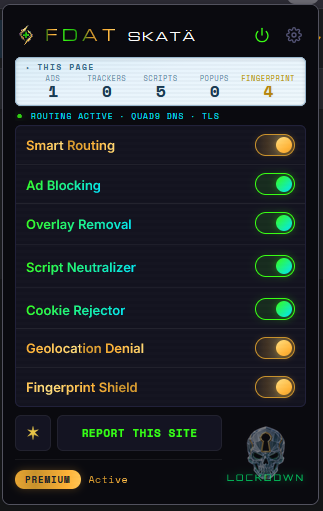
FDAT popup showing Smart Routing active

Focus Mode

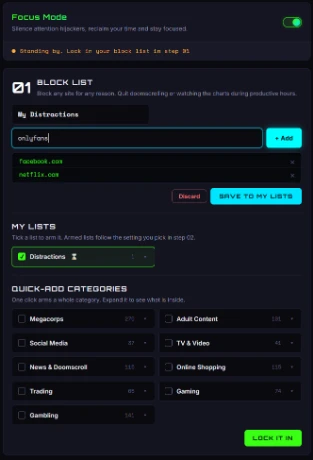
Block the sites that derail work or study. Pick from 9 ready-made lists including social media, news, streaming, gaming, shopping, gambling, or just build your own. Run it on a schedule or around the clock, and optionally lock it behind a passphrase so it can't be switched off on impulse.

* Focus Mode Armed  |  Blocklist locked  |  Passphrase set
01

Blocklist

Pick from 9 ready-made lists, or build your own from any sites you choose.

02

Schedule

Set it for work hours, study time, or around the clock.

03

Passphrase

Optional. A passphrase is required to unlock early during a blocked window.

04

Lock

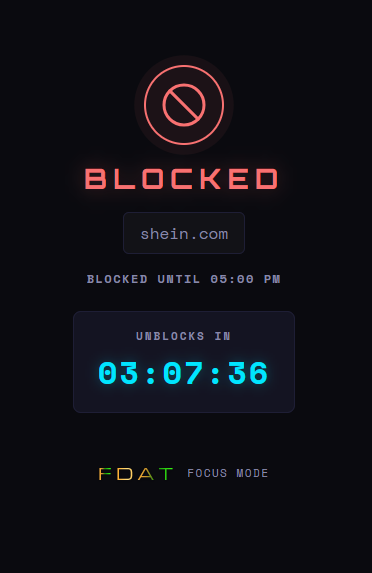
Blocked sites show a countdown to when they reopen.

Focus Mode block list
Focus Mode blocked screen with unblock countdown

Ad Blocking

300,000+ filter rules, real-time script interception, and cosmetic filtering. Removes video ads, banners, pop-unders, and pre-roll ads, catches first-party ads that standard blockers miss.

* Ad Engine Live  |  300,000+ rules  |  First-party scan on
01

On

Runs on every site by default, with no per-site setup.

02

Block

Ad and tracker requests are stopped before they load.

03

Scan

Cosmetic filters catch ad slots that slip past the network layer.

04

Remove

Empty slots are collapsed, so no blank gaps are left behind.

Tracker Neutralization

Stubs tracker SDKs with null data before they load. Strips tracking parameters from URLs. Detects 106,000+ CNAME-cloaked trackers hiding behind first-party domains.

Fingerprint Shield

Spoofs 30+ fingerprinting vectors including canvas, WebGL, audio context, screen dimensions, battery and hardware specs. Every site sees a different "device," which makes cross-site fingerprint tracking far harder.

Lockdown Mode

One click to kill all active content on a page. Blocks JavaScript, iframes, WebSockets, fonts, cookies, camera, and microphone access. For when you need maximum security on a suspicious site.

Hide ANYTHING

We can't block every legit but annoying popup, chat icon or bad UI design on every website, but you can! Right click on almost anything on any website and simply remove it. Or select the Element Hider button in the extension and reduce a page to only your required elements. Easy to remove or report.

Select it

Right click and select Remove Element for single items. On Android and for multi-select options, use the Element Hider button in the extension, then hover any element and it lights up with a gold cutout. Roll the scroll-wheel to expand or contract the selection until it is exactly right, or select multiple indivitual elements to remove.

One click to hide

Click HIDE and it's gone. The gap collapses so the page stays clean, and a single Undo brings it all back if you change your mind.

Make it stick

Tick Remember and the element stays hidden on that site on every future visit, applied the instant the page loads. Manage everything you have hidden from the options/reporting page.

Or report it for everyone

Send it to us with one click. When enough people flag the same thing, we add it to the filter lists so nobody has to see it again.

Plus, So Much More

Faster BrowsingFewer ads and scripts means pages load quicker and use less data.
Cookie RejectionAuto-rejects consent banners across multiple frameworks in 19 languages.
Overlay RemovalClears subscribe modals, newsletter popups, and nag screens.
WebRTC Leak ProtectionSeals the leak that can expose your real IP from behind a VPN.
Geolocation DenialBlocks location requests or returns random coordinates.
Clipboard ProtectionStops sites reading or replacing what you copied.
Notification Auto-DenyEnds the incessant "Allow notifications?" prompts.
Global Privacy ControlSends the legally recognized (us) opt-out of targeted ads & data sharing signal.
CNAME UnmaskingDetects trackers hiding behind first-party subdomains.
Anonymous by DesignBlind-token auth. No personal data required, nothing to leak or sell.
Easy CustomizationToggle features per-site, or pause everything with one click.
Malware DefenseIntegrated ThreatFox filters, updated weekly, derail scams and malware distribution networks.

Get It Here:

FirefoxFirefox Add-ons
ChromeChrome Web Store
Coming soon to Chrome

Questions?

Is Skatä really free?

Yes, all essential features included. Consider upgrading to the premium tier which includes some bonus features to support the project.

How is Smart Routing different from a VPN?

A VPN tunnels ALL your traffic through a remote server, slowing down everything and flagging all your traffic as VPN traffic. This means constantly having to enter captchas, "are you a bot?" checks, and logins breaking. Some regular websites simply block VPN traffic. Smart Routing only routes select sites through its chain to restore geo-restricted sites, so your regular browsing stays unaffected. Think of it as a "smart VPN" that only activates when needed.

Custom sites are only added via community reporting, you can't ad your own. If you want full coverage for every single website or the ability to change locations, that's when a VPN makes sense, and Skatä works perfectly alongside any VPN you choose.

Do you log my browsing?

No! We are genuinely pro-privacy and actively take steps to protect our users. We never see what sites you visit, and our anonymous token system means we don't even know who you are.

Which countries are supported?

United Kingdom, Europe, Oceania, Canada, South America, and more. Each region has a community-curated list of geo-blocked domains. You can submit any blocked sites you discover and they will be reviewed for inclusion.

Can I submit a blocked site?

Yes! Use the extension's "Submit a Site" feature. Websites promoting violence, racism, or illegal content are not welcome.

How do I upgrade to Premium?

Open the extension settings (click the cog icon), go to the Account tab, and choose your plan. Pay with Monero, Ethereum, Tron, Solana, or Bitcoin. Premium gets you bonus features and supports ongoing development.

Is my data safe?

We dont keep any personal data. A blind-token authentication system replaces accounts. Your random token is generated locally and never leaves your browser. Only its SHA-256 hash is sent to our server. We can't reverse the hash, so we can't link your identity to your usage.

Does it work on mobile?

Android: Yes! Firefox for Android supports extensions, so you can install FDAT Skatä from the Firefox Add-ons store. Some Chromium-based browsers like Kiwi Browser also support Chrome extensions on Android.

iOS: Not yet. Apple doesn't allow browser extensions in Chrome or Firefox on iPhone/iPad.

Privacy News

June 2026

Canada's Surveillance Summer: What the 2026 Digital Bills Actually Do

Bills C-22, C-34, C-36 and C-9 moved through Parliament before the summer break. What each does to your privacy, the encryption fight, and how to push back.

Read More →
March 2026

Online Ads Are Tracking You. Some Are Trying to Hack You.

How Forbes and the NYT accidentally served ransomware to their readers, plus every method advertisers use to follow you across the web.

Read More →
March 2026

The Porn ID Laws: What's Happening in the UK and Australia

Both countries now require real ID to view adult content online. Here's what the laws say, what sites are blocked, and the privacy risks nobody's talking about.

Read More →
February 2026

UK Online Safety Act: Encrypted Privacy Under Threat

Ofcom's new enforcement powers target end-to-end encryption and age verification. We break down what the Online Safety Act means for your digital rights.

Read More →
March 2026

Best VPNs Rated for Privacy in 2026

We reviewed 4 major VPNs based on real audit results, jurisdiction, and real-world proof. Plus: when a VPN isn't the right tool for the job.

Read More →
January 2026

EU Digital Services Act: The Chilling Effect on Free Speech

The DSA requires platforms to remove "illegal content" within hours. But who decides what's illegal? And why are legitimate sites getting caught in the crossfire?

Read More →
March 2026

Australia's New Internet Censorship Laws: What You Need to Know

The Online Safety Amendment Act 2025 expanded ACMA's powers to block websites without court orders. Here's how it affects your browsing and what you can do about it.

Read More →

Get In Touch

Found a bug? Want a feature? Just want to say hi?
We love hearing from our users.